Setup
This time, someone
else sets it up.
Before you decide.
Your last tools did not die because your team is bad at software. Each one arrived as a blank workspace and a login, and setting it up fell to the person with the least time. Usually you.
You did not fail to adopt a system.
You were handed an empty one.
Everyone else sets it up with you, after you buy. We build yours from your website, before you decide. If you buy, we move your live work in and train your team, on a go-live date we agree before you pay.
Pick a timeSending this to whoever will run it day to day? Jump to the part written for them.
Before your second call,
our team builds your
workspace by hand.
Marko Šipka is our onboarding lead. He runs your 10-minute call, then helps building your workspace from your website and your answers, in one pass against a written checklist. It is not a demo agency wearing your logo.

Marko ŠipkaOnboarding lead
What the 10-minute call asks
Who touches the work. What you deliver, and in which file types. Three clients we can put in your workspace. What you already ask clients when new work comes in. How you get paid. Who will own the system day to day. It is not a demo and not a pitch.
What goes in, and what it becomes
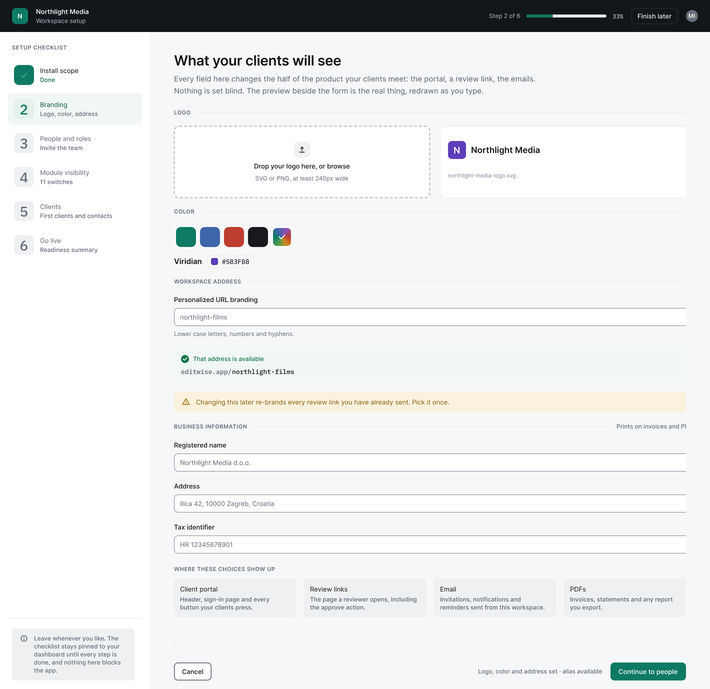
- Your website becomes your logo and brand colors on your client portal, your sign-in pages and the menus your team sees.
- At least three of your real clients, taken from your public work and confirmed on the call, become client records ready for projects.
- The services you sell, in the words you used on the call, become your project templates.
- The questions on your contact or brief page become an intake form your clients fill in.
- The work you deliver becomes two or three deliverables in your real file types, each with a version and a couple of realistic comments.
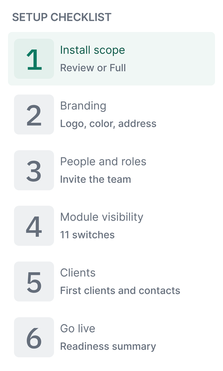
- Who touches the work decides whether you start with review only or with everything, and the modules you do not need are already switched off.
You see it running
on your own agency
before you pay.
If you buy, you keep it.
Within a week of the 10-minute call, you spend 45 minutes with Marko Živić, our founder, inside your own workspace. Your clients, your services and your logo are already there. No demo agency. No empty trial.
If you buy, that workspace becomes yours, and your install starts from it. If you do not, you owe nothing.
-
30 seconds. Your website, your team size and what you use today.
-
10 minutes. A call with Marko Šipka, inside 48 hours. We book the second call before we hang up.
-
About 3 days after the call your preliminary workspace will be ready. We will build everything by hand.
-
45 minutes. You and the founder, in your own workspace. Then you decide.
Setup is one fixed scope.
Here is all of it.
The same seven things for every firm. Nothing is quoted per head (except complete historical data migration).
-
Your workspace built. Clients, contacts, users, roles and permissions mapped to how your firm actually divides work.
-
Your project templates, built from your real service lines.
-
Your intake forms, built from the questions you already ask clients.
-
Your branding across the portal, the review links and every client touchpoint.
-
Your install scope configured, module by module, with per-role landing views set so each person sees only their own surface.
-
One live handover session with the owner and whoever will run it day to day.
-
Role-specific recorded training, permanent, a set of learning materials custom tailored to your team. With video calls for clarification and hands on help.
Setup is included on annual plans. On the monthly plan it is $1,500, once.
Pricing: setup included on annualAfter you sign, the install
runs in five steps.
Same steps, same order,
every time.
-
Audit, 60 minutes. How work comes in, who touches it, what your client sees and how it gets billed. We also write down how you run today: projects a month, turnaround, revisions per deliverable, hours spent chasing status.
-
Build. We build everything for you. Roles, permissions, templates, forms, branding and first screens, starting from the workspace you already saw.
-
Load. Your live projects and current deliverables. Not years of history (more on that below).
-
Train. Live video handover sessions, plus a set of recorded videos for each role.
-
Verify. We check the three goals we agreed with you in writing before we started.
Three goals, in writing, before we start
- One operational target, taken from the numbers we wrote down at the audit.
- One adoption target, always the same: your team logs a full week of real work in EditWise without falling back to the old way.
- One thing you can point at when it is done.
We check them when the install ends, and again at day 90 and month 6. That is how both of us know it worked.
Your team is trained
before go-live.
Training is part
of every setup,
not an extra.
01One live session
We schedule live handover sessions with you and whoever will run it day to day. It covers only what your firm does every day.
02Recorded, one per role
Everything else is in short recorded videos. Videos are created per role. They stay, so the freelancer who joins for one project, or the editor you hire next year, learns from the same video.
03Their own screen
Each person lands on their own screen. Your editors see only buttons you allow them to see, and you pick which are those.
When the way you
work changes, your
workspace changes
with it.
Annual plans include a free Change Window once a year, 90 minutes, run by us. Use it for new approval routes, templates, client structures or billing rules, and to retrain anyone who needs it.
Switched back on
Anything you switched off at setup can be switched back on whenever you want, with no contract change.
Your live work moves in at setup. Years of history are a separate job, quoted in writing.
At setup we load your live projects and current deliverables, so your team starts on real work on day one.
Setup is included with an annual plan. If you have years of history in another system, we scope the move separately.
Here is why. Three months of work in a shared drive and nine years of projects in an old agency system are two different jobs. One fixed price would overcharge the first firm and underprice the second. So we scope your move on a call and quote it in writing.
Not ready to move everything? Start with review only, or run one service line in EditWise next to your current tools for a month.
EditWise vs your current stackFor whoever runs it day to day
Here is what setup asks of your team, in hours, and what it does not.
What we need from you
- 60 minutes for the audit, with whoever knows how work comes in and how it gets billed.
- One live handover session, with you and the owner.
- A few videos per person to watch, for their own role.
- Two live client projects to start on.
What we do not ask
- No spreadsheet of requirements.
- No weeks of configuration on your side.
- No building templates, forms or roles yourself.
- No retyping your live projects. We load them.
What the owner
commits to, in writing
Before setup starts, the owner signs on as the sponsor. They announce the rollout to the team, come to the kickoff and the day-30 review, and say on the record that the old way is retired. You will not be left defending a new system on your own.
The team that builds the workspace also runs your install. If you have questions this page does not answer, we offer a 20-minute session for the person who will run it, after the founder call.
Who sets up EditWise,
and how long does it take?
EditWise sets it up, not you. Before you buy, Marko Šipka, the EditWise onboarding lead, builds your workspace with our team by hand from your website and a 10-minute call, and you see it running on a 45-minute call with the founder.
After you sign, EditWise runs the install: an audit, the build, loading your live projects and current deliverables, training, and a check against goals agreed in writing. The go-live date agreed before you pay is guaranteed: miss it and a month of seats is free, one month at most.
Pick a time. We will have your
workspace built when you arrive.
The first call is 10 minutes. We build your workspace after it and walk you through it on the second.
Pick a timeThree fields and no card. If we are not a fit, we tell you on the 10-minute call.
The first call is 10 minutes. We build your workspace after it and walk you through it on the second.