How it works
Every tool you tried
looked like a cockpit.
Here, your editors see
four buttons.
It runs the whole client job in one system, from the request to the invoice. Before anyone on your team logs in, we switch off what you do not use, and each person lands on the one screen their work needs.
The first call is 10 minutes. We build your workspace after it and walk you through it on the second.
Every client job runs the
same nine steps.
All nine live in one system.
Today each step lives somewhere else. The request is in WhatsApp, the brief is in your head, the notes are in email and the invoice is in a spreadsheet. In EditWise they run as one chain. A client’s comment becomes a revision, the revision counts toward the round, and approved work goes on the invoice.
Your client sends new work through a form you designed. It arrives as a project, not a message.
Client request formsThe answers stay with the project, so what the client asked for is written down once, where the whole team can read it.
Client request formsEach project holds what you owe the client: the cut, the stills, the script, the PDF.
Client review and approvalEvery new cut is a new version. The old ones stay in the history, and your client picks which one to review.
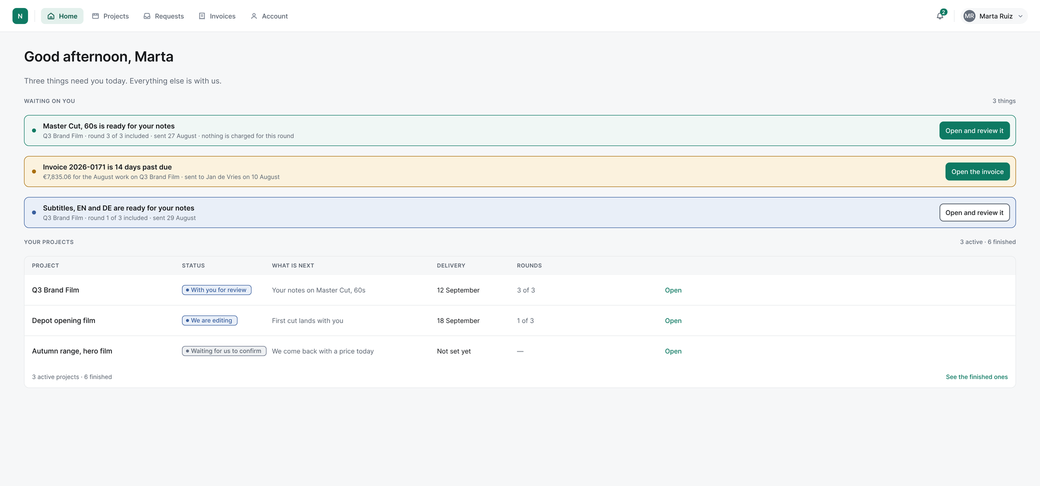
Client review and approvalYour client opens a link from any chat, draws on the frame and comments. No account, no password.
Client review and approvalComments become a revision. Your client sees the count, such as Round 2 of 3, before they comment.
Revision rounds and invoicingYour client presses approve, in the same place they commented.
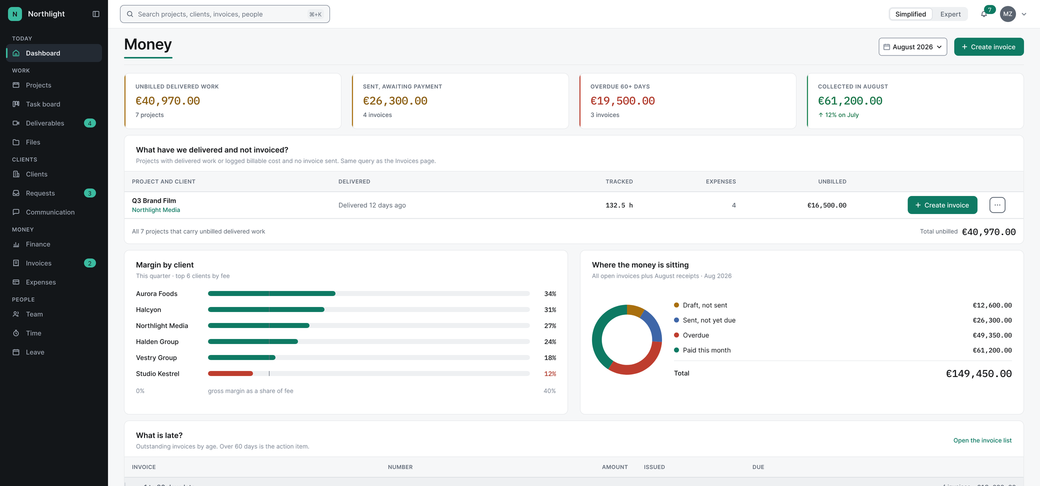
Client review and approvalBuild it from delivered and approved work, priced off the client’s agreement, and export it as a PDF. Delivered work with no invoice turns amber on your first screen.
Revision rounds and invoicingSee which clients make money and which projects run over budget, with or without a timer.
Revision rounds and invoicing01 · Request
Who: Your client
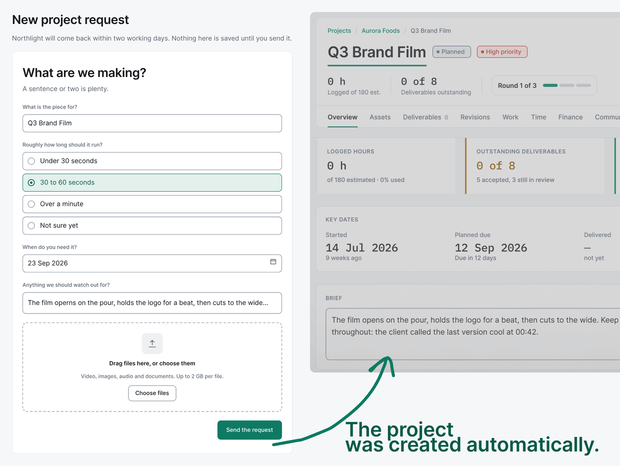
A new job lands as a project with deadline and brief attached.
02 · Brief
Who: Your team
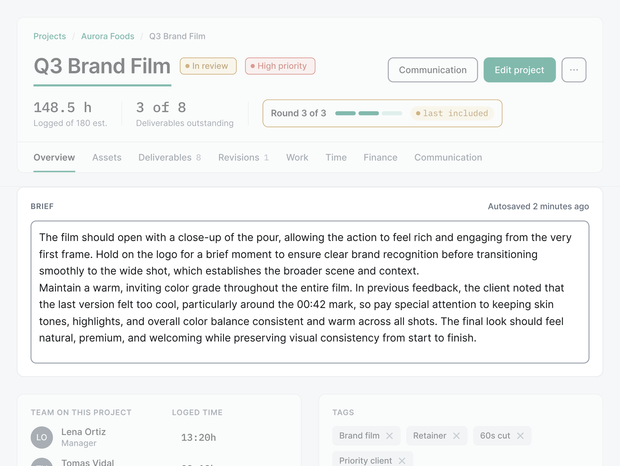
One brief, visible to everyone on the job.
03 · Deliverable
Who: Your team
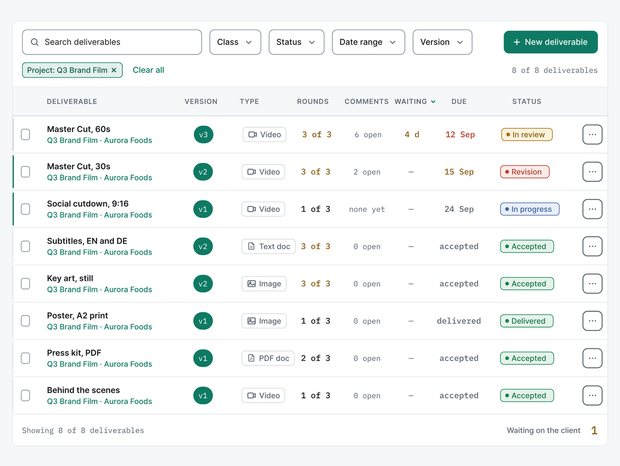
Every promised file is listed on the project.
04 · Version
Who: Your team
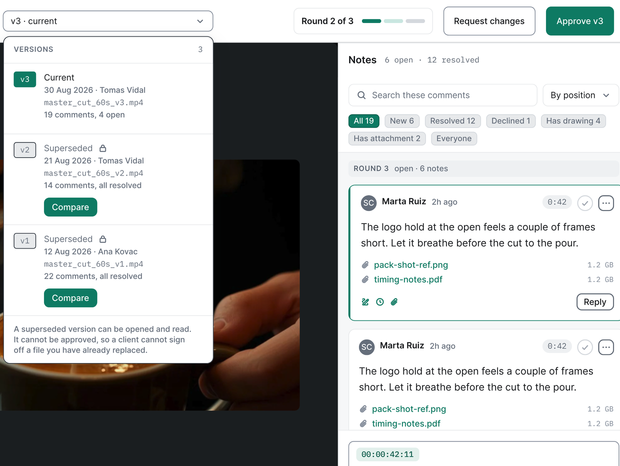
v1, v2, v3 side by side, nothing overwritten.
05 · Review
Who: Your client
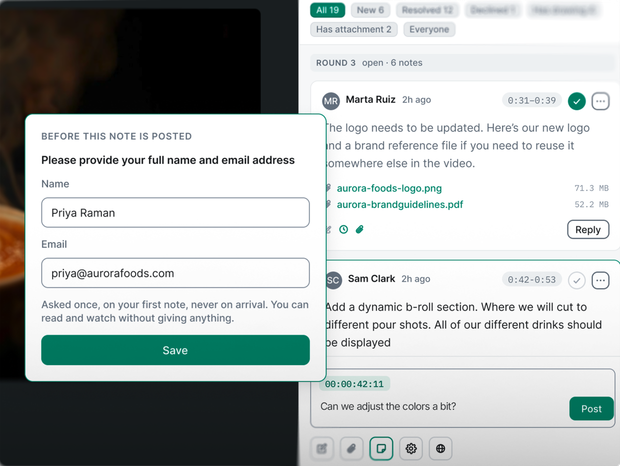
Frame-accurate comments, no login.
06 · Revision round
Who: EditWise does it
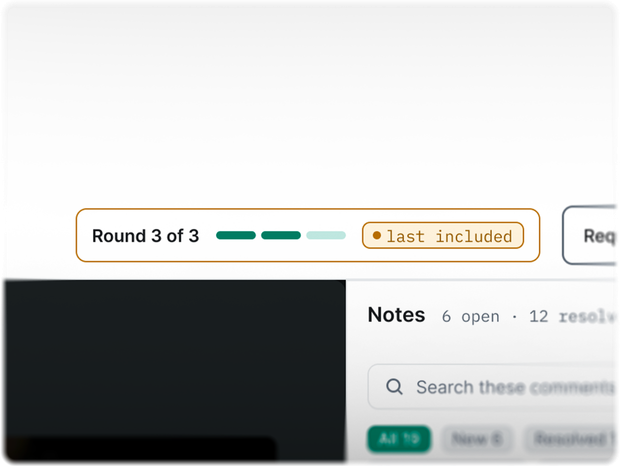
The round counter updates itself.
07 · Approval
Who: Your client
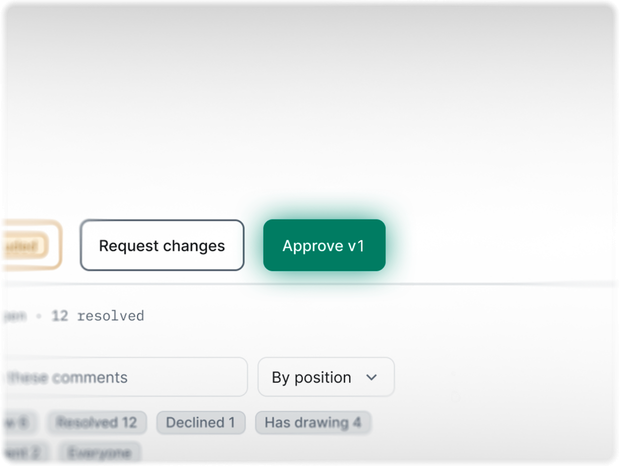
One click closes the loop.
08 · Invoice
Who: Your team
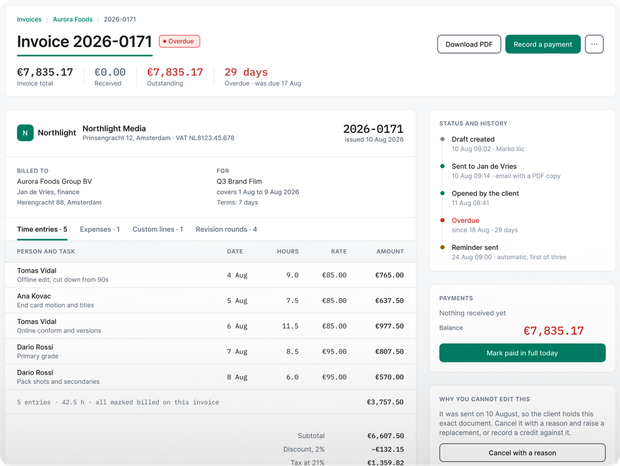
Approved work becomes invoice lines.
09 · Profit
Who: EditWise does it
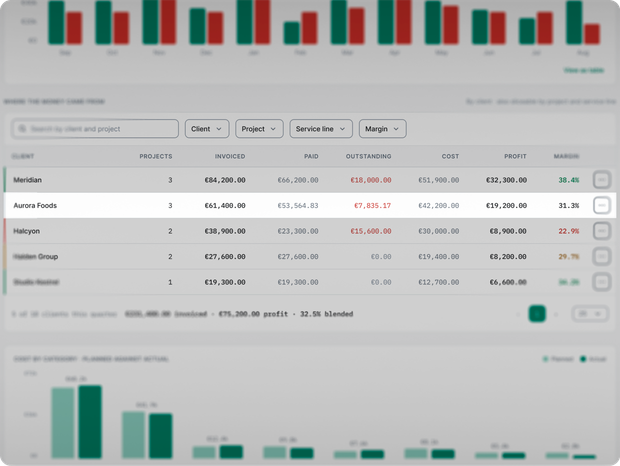
Profit per client, calculated for you.
You pick
the four buttons.
We switch off the rest
before anyone logs in.
On the install call we ask what you use and what you do not, and we switch modules off while you watch. A firm that only needs review switches off time tracking, time off, budgets and invoicing, and nobody on the team ever sees them. Anything you switch off comes back on whenever you want, with no contract change and no price change.
Simple by default
Every new workspace opens in simplified mode. Anyone who wants more on screen can switch to expert mode for themselves. Their role still decides what they are allowed to see, and nobody else’s screen changes.
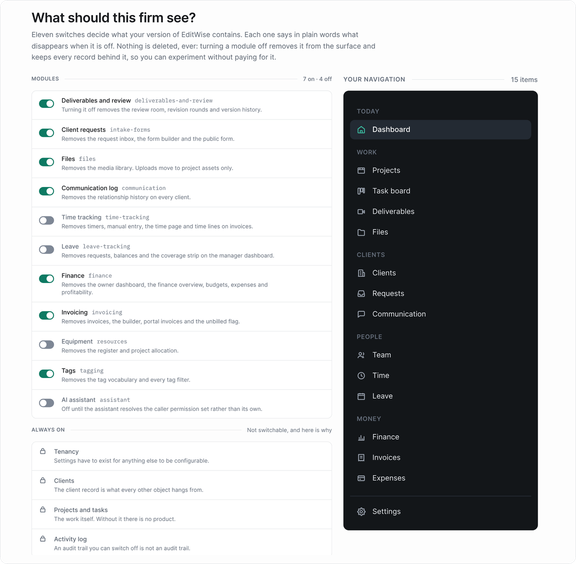
No timesheets in your studio? Switch time tracking off.

If you pay editors per project, a timer means nothing to you. In a team that runs on trust, it can even feel like being watched. Switch time tracking off and it is gone for everyone. You still see which clients make money, because profit comes from the project budget, not from a timer.
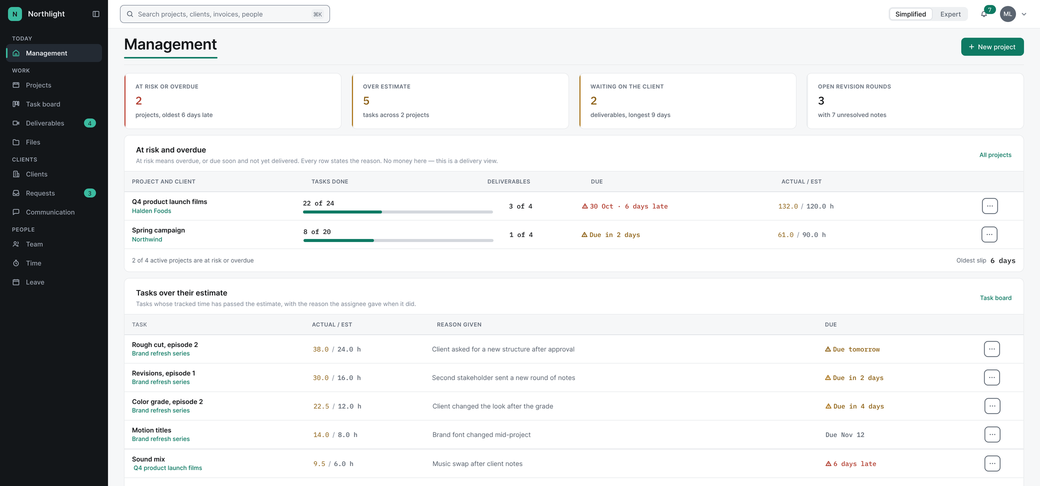
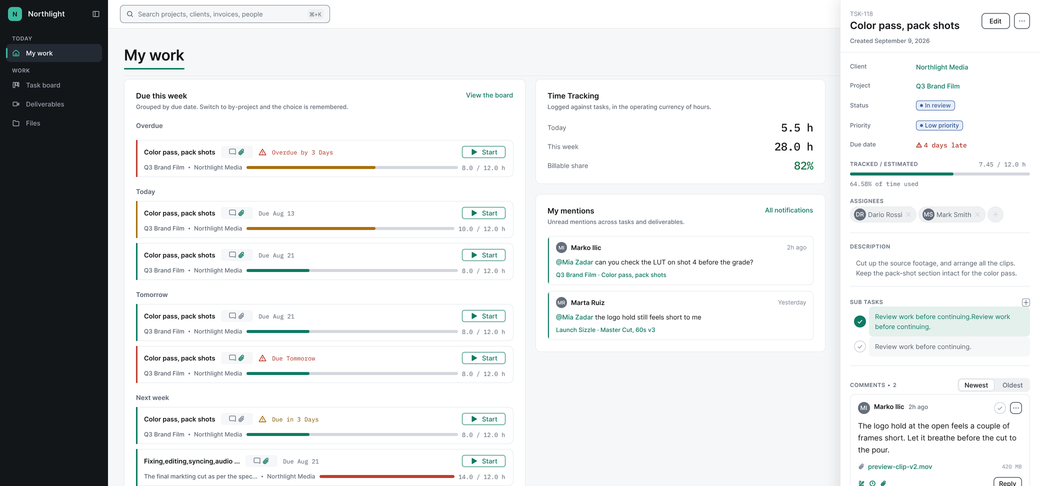
If you keep it, keep it for two jobs: billing clients by the hour, and keeping workloads fair. Time goes in by hand or with a stopwatch, and the task board flags tasks that run past their estimate. Watch the work, not the people.
Start with review only, or with everything. Same price.
You do not have to move your whole operation on day one.
-
Review install
Your clients, your portal, reviews, revisions, rounds and request forms. Time tracking, budgets and invoicing stay switched off.
Target: live inside 5 working days.
-
Full install
Everything in the Review install, plus time tracking, time off, budgets, expenses, invoicing, profit per client and your money screen.
Target: live inside 10 working days.
Same price, same seat rate. You choose on the install call, and moving from Review to Full later is a switch, not a new contract. We set up whichever you pick and train your team: one live handover, plus a short video for each role that stays available. Who builds it, and how long it takes: Setup.
Go-live times are targets until we have measured ten installs. Then we publish the real numbers.
It works next
to your tools.
It does not plug
into them.
Better to say it before you ask. EditWise has no integrations, no public API and no webhooks in year one. If your workflow depends on one today, we are not right for you yet. Here is how it sits next to what you already use.
-
Your client’s chat. Send the review link in WhatsApp, email, Slack or any chat your client already uses. They tap it and they are in.
-
Your accountant and your accounting tool. Every invoice exports as a PDF. EditWise produces the commercial invoice that carries the line-item record of what was delivered and what was approved, and you file it through your own compliant system.
-
WhatsApp threads and calls. Log a WhatsApp thread, a call or a meeting against the client or the project, so the record sits with the work. The channel is only a label on the log. EditWise sends and reads nothing on WhatsApp or any other channel.
-
Your editing software. There is no plugin. Your editor exports the cut and uploads it.
How does EditWise work?
- EditWise runs each client job as one chain in one system: request, brief, deliverable, version, review, revision round, approval, invoice and profit.
- Clients send new work through request forms the agency designs, then review and approve from a link with no account and no password.
- Client comments become revisions.
- The owner’s first screen flags delivered work that has no invoice and shows which clients make money.
- Each person sees only their part: editors see four buttons, chosen by the owner, and modules the agency does not use are switched off before the team logs in.
- The EditWise team builds each workspace by hand from the agency’s website and a 10-minute call.
See it running on your own agency
before you decide.
Pick a time. We will have your workspace built when you arrive. The first call is 10 minutes. We build your workspace after it and walk you through it on the second. On that call you point at what your team does not need, and we switch it off while you watch.
Our own production team runs its client work on EditWise every day.
EditWise does a lot. Your editors see almost none of it.