Revision rounds and invoicing
The approval and
the invoice are
the same event.
The work went out three weeks ago. The invoice did not. Nobody chose to skip it. The approval came in on a busy Friday, and by Monday there were new fires.
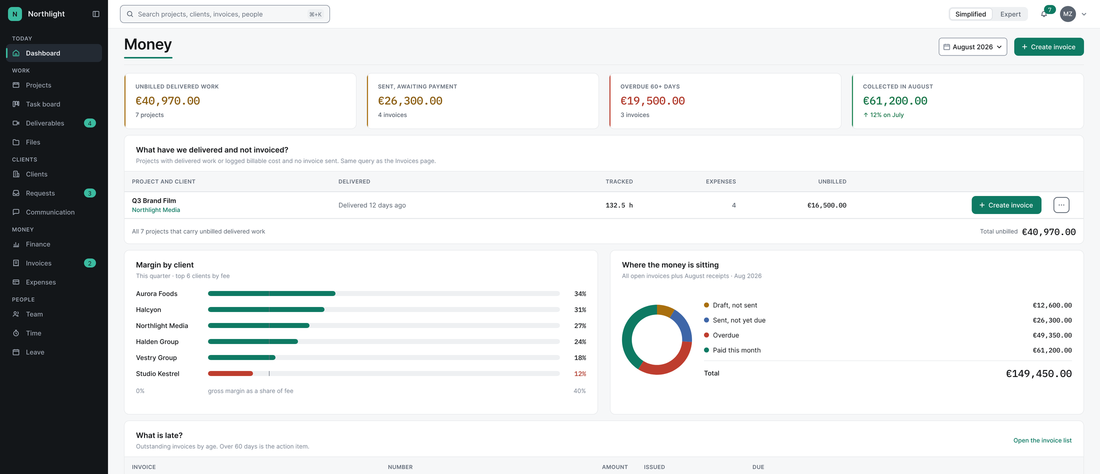
In EditWise, delivered work with no invoice turns amber on your first screen the day it goes out, and you get a notification. It stays amber until the work is on an invoice you have marked as sent.
- Nothing forgotten
- Nothing given away by accident
- No timer needed to see it
- Invoice created within seconds
The first call is 10 minutes. We build your workspace after it and walk you through it on the second.
Example workspace
Rounds are agreed up front.
Your client sees the rule
before they comment.
Round four of a job you quoted for two. Nobody counted, so nobody paid. And raising it now would feel petty. Here is how it runs instead, in the order your client meets it:
-
You agree the included rounds with your client and set that number for the client agreement or the project. You choose it: generous owners set more, careful owners write it into the contract.
-
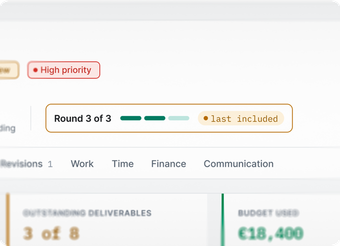
Before your client comments, they see where they are: Round 2 of 3.
-
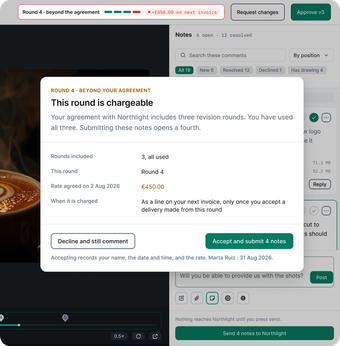
If a comment would start a round past the agreement, your client sees its price before they send it.
-
They decide. Only with their yes does it become a line on the next invoice, at the rate you agreed.
Example workspace
Nobody is surprised, and you never have to bring it up.
Would your clients hate a counter?
The counter charges nobody. It shows your client the rule you both agreed, at the moment it matters, and leaves the choice with them. If you want to be generous, set more rounds. The price always shows before the client sends. We built the feature on that rule.
Build the invoice from approved work. Keep the tool that collects the money.
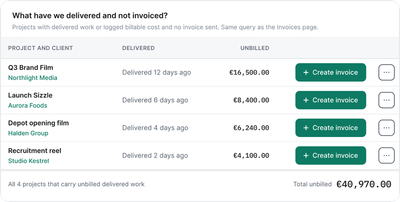
Example workspace
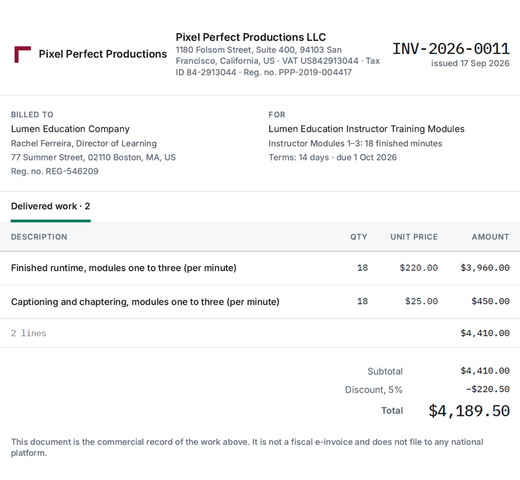
Your client’s invoice lists, line by line, what you delivered and what they approved. You build it from the delivered and approved work, the time, the expenses and any custom line. It is priced off the agreement you set for that client: hourly, per minute, per project, subscription, retainer or fixed price.
Export it as a PDF, and move its status by hand from draft to sent to paid. There is no pay button, and EditWise collects no money. Your client pays you outside EditWise, by bank transfer against the invoice or through the tool you already use.
EditWise produces the commercial invoice that carries the line-item record of what was delivered and what was approved, and you file it through your own compliant system.
Your invoicing already runs somewhere else? Keep it.
Keep your collection tool, your fiscal system and your accountant. EditWise produces the detail your client sees and tells you what was never billed. Your own tool collects the money and files it.
See which clients
make money.
No timer required.
Which client made you the most money last month? Right now that is three spreadsheets to answer one question.
In EditWise every project has a budget: expenses, time costs, what is left, and a warning when it runs over. Profit per client comes from those budgets, so you see it even if nobody tracks a minute. If you bill by the hour, track time by hand or with a stopwatch. If you do not, switch time tracking off.
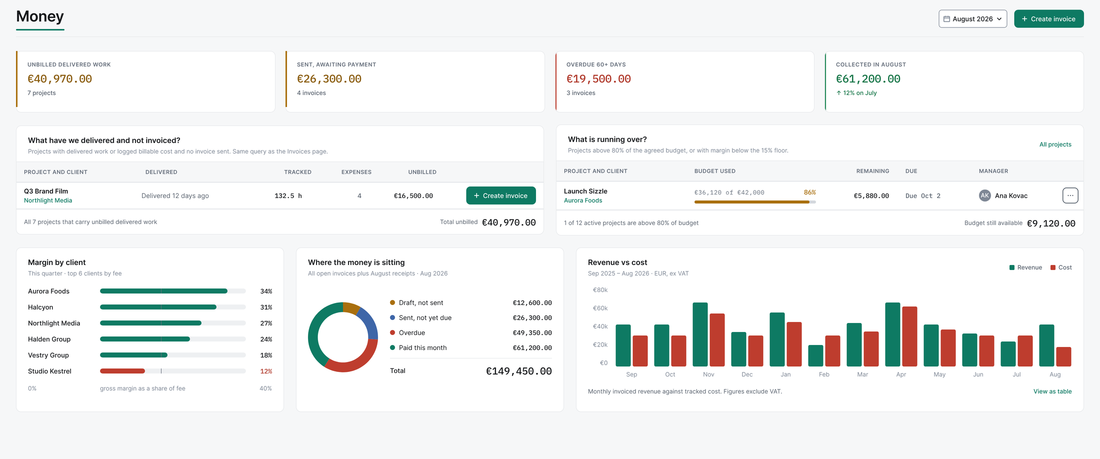
Example workspace
Your first screen answers four questions
-
What was delivered and not invoiced?
-
Which invoices are overdue or unpaid?
-
Which clients make you the most money, and which the least?
-
Which projects are over budget?
Your editors never land on this screen, and rates and client money can be kept away from them.
The money screen comes with the Full install. On a Review install, money stays switched off until you want it.
How do you charge
a client for extra
revision rounds without
an argument?
Agree the rounds up front and show the client the rule before they comment. In EditWise, the agency sets the included rounds per client agreement or project. The client sees a counter such as Round 2 of 3 before commenting.
If a comment would start a round past the agreement, the client sees that round’s price before sending it. Only if the client goes ahead does it become a line on the next invoice, at the agreed rate. Because the client sees the price first, the charge is never a surprise.
EditWise produces the commercial invoice that carries the line-item record of what was delivered and what was approved, and you file it through your own compliant system.
See the chain from approval to
invoice on your own workspace.
Pick a time. We will have your workspace built when you arrive. The first call is 10 minutes. We build your workspace after it, with your clients in it, and walk you through it on the second.
Pick a timeOur own production team runs its client work on EditWise every day.
By the time your client presses approve, the work is already on your screen, waiting for its invoice.